
Human in the Loop
Human-in-the-Loop (HITL) workflows integrate human judgment and oversight into automated processes. These workflows pause at critical points for human review, validation, or decision-making before proceeding.
- Compliance: Regulatory requirements may mandate human approval for certain actions.
- Safety: High-stakes operations (payments, deletions, external communications) need oversight.
- Quality: Human review catches errors AI might miss.
- Trust: Users feel more confident when they can approve critical actions.
| Use Case | Example |
|---|---|
| Financial approvals | Expense reports, payment processing |
| Content moderation | Publishing, email sending |
| Data operations | Bulk deletions, exports |
| AI tool execution | Confirming tool calls before running |
| Access control | Granting permissions, role changes |
Cloudflare provides two main patterns for implementing human-in-the-loop:
For durable, multi-step processes with approval gates that can wait hours, days, or weeks. Use Cloudflare Workflows with the waitForApproval() method.
Key APIs:
waitForApproval(step, { timeout })— Pause workflow until approvedapproveWorkflow(instanceId, options)— Approve a waiting workflowrejectWorkflow(instanceId, options)— Reject a waiting workflow
Best for: Expense approvals, content publishing pipelines, data export requests
For MCP servers that need to request additional structured input from users during tool execution. The MCP client renders a form based on your JSON Schema.
Key API:
elicitInput(options, context)— Request structured input from the user
Best for: Interactive tool confirmations, gathering additional parameters mid-execution
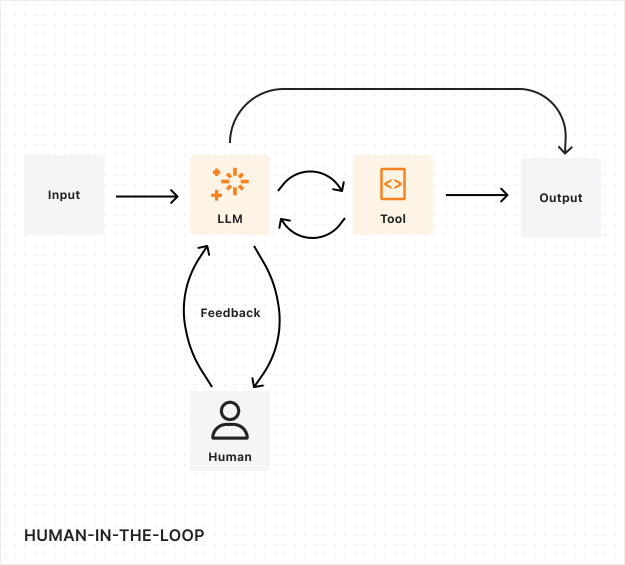
In a workflow-based approval:
- The workflow reaches an approval step and calls
waitForApproval() - The workflow pauses and reports progress to the agent
- The agent updates its state with the pending approval
- Connected clients see the pending approval and can approve or reject
- When approved, the workflow resumes with the approval metadata
- If rejected or timed out, the workflow handles the rejection appropriately
Human review processes do not operate on predictable timelines. A reviewer might need days or weeks to make a decision, especially for complex cases requiring additional investigation or multiple approvals. Your system needs to maintain perfect state consistency throughout this period, including:
- The original request and context
- All intermediate decisions and actions
- Any partial progress or temporary states
- Review history and feedback
Set timeouts to prevent workflows from waiting indefinitely. Use scheduling to:
- Send reminders after a period of inactivity
- Escalate to managers or alternative approvers
- Auto-reject or auto-approve based on business rules
Maintain immutable audit logs of all approval decisions using the SQL API. Record:
- Who made the decision
- When the decision was made
- The reason or justification
- Any relevant metadata
Human reviewers play a crucial role in evaluating and improving LLM performance. Implement a systematic evaluation process where human feedback is collected not just on the final output, but on the LLM's decision-making process:
- Decision quality assessment: Have reviewers evaluate the LLM's reasoning process and decision points.
- Edge case identification: Use human expertise to identify scenarios where performance could be improved.
- Feedback collection: Gather structured feedback that can be used to fine-tune the LLM. AI Gateway can help set up an LLM feedback loop.
Robust error handling is essential for maintaining workflow integrity. Your system should gracefully handle:
- Reviewer unavailability
- System outages
- Conflicting reviews
- Timeout expiration
Implement clear escalation paths for exceptional cases and automatic checkpointing that allows workflows to resume from the last stable state after any interruption.